Note: Cost figures in this article are indicative estimates based on typical cloud pricing patterns. Actual costs vary significantly based on provider, region, commitment level, and workload characteristics. Use these as directional guidance, not precise projections.
The conversation usually starts with GPUs. “We need more GPUs.” “GPU costs are killing us.” “If we had better GPUs, we could train faster.”
GPUs are expensive. They’re also visible — big line items that draw attention. But in most ML infrastructure deployments, GPUs aren’t where the money actually goes. Or rather, they’re not where the waste goes.
The biggest cost savings in ML infrastructure rarely come from GPU optimisation. They come from the boring stuff: storage nobody remembers to delete, compute that sits idle, data that crosses network boundaries repeatedly, and operational complexity that requires expensive humans to manage.
Where Cost Actually Goes
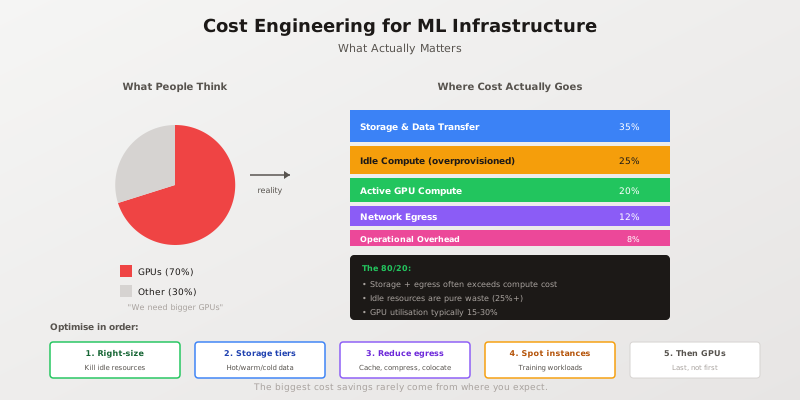
A typical ML infrastructure bill breaks down differently than most teams expect:
Storage and data management: 30-40%
Training data, model checkpoints, experiment artifacts, logs, feature stores, vector databases. Data accumulates. Old experiments never get deleted. Checkpoints from failed runs persist forever. That “temporary” dataset from six months ago is still in S3.
Idle and overprovisioned compute: 20-30%
Inference clusters sized for peak load running at 15% utilisation. Development GPU instances left running overnight. Kubernetes clusters with generous resource requests and minimal actual usage. Auto-scaling that scales up eagerly and down reluctantly.
Active compute (including GPUs): 15-25%
The actual work — training runs, inference serving, data processing. The part everyone focuses on.
Network egress: 8-15%
Data moving between regions, between clouds, between services. Every byte that leaves a cloud provider’s network costs money. Cross-region replication, API responses, model downloads.
Operational overhead: 5-10%
Monitoring, logging, security scanning, compliance tooling. The infrastructure to manage the infrastructure.
The exact percentages vary by organisation, but the pattern is consistent: storage and idle resources typically exceed active compute costs. Yet optimisation efforts focus disproportionately on making training 10% faster rather than eliminating the 25% of compute that does nothing.
The 80/20 of Cost Optimisation
Optimise in order of impact, not visibility.
1. Kill Idle Resources
The highest-ROI cost optimisation is eliminating resources that aren’t doing anything. This sounds obvious. It’s also consistently underexecuted.
Find idle compute:
import boto3
from datetime import datetime, timedelta

def find_idle_instances(min_cpu_percent: float = 5.0, days: int = 7):
    """Find EC2 instances with sustained low CPU utilisation."""
    ec2 = boto3.client('ec2')
    cloudwatch = boto3.client('cloudwatch')

    instances = ec2.describe_instances(
        Filters=[{'Name': 'instance-state-name', 'Values': ['running']}]
    )

    idle_instances = []
    end_time = datetime.utcnow()
    start_time = end_time - timedelta(days=days)

    for reservation in instances['Reservations']:
        for instance in reservation['Instances']:
            instance_id = instance['InstanceId']

            # Get CPU utilisation
            response = cloudwatch.get_metric_statistics(
                Namespace='AWS/EC2',
                MetricName='CPUUtilization',
                Dimensions=[{'Name': 'InstanceId', 'Value': instance_id}],
                StartTime=start_time,
                EndTime=end_time,
                Period=3600,  # Hourly
                Statistics=['Average']
            )

            if response['Datapoints']:
                avg_cpu = sum(d['Average'] for d in response['Datapoints']) / len(response['Datapoints'])
                if avg_cpu < min_cpu_percent:
                    idle_instances.append({
                        'instance_id': instance_id,
                        'instance_type': instance['InstanceType'],
                        'avg_cpu': avg_cpu,
                        'launch_time': instance['LaunchTime']
                    })

    return idle_instances
Run this weekly. Automate termination for development instances. Require justification for production instances below threshold.
GPU utilisation is typically abysmal:
Most GPU instances run at 15-30% utilisation. The GPU is expensive, but it spends most of its time waiting — waiting for data to load, waiting for preprocessing, waiting for the next batch.
# Check GPU utilisation on NVIDIA instances
nvidia-smi --query-gpu=utilization.gpu,utilization.memory --format=csv -l 5
If utilisation is consistently below 50%, you’re paying for capacity you’re not using. Options: smaller instances, better batching, or GPU sharing (MIG on A100s, time-slicing on smaller GPUs).
2. Implement Storage Lifecycle Policies
Data has a half-life. Training data from last year’s model is rarely accessed. Checkpoints from experiments that didn’t pan out serve no purpose. Logs older than your retention requirement are liability, not asset.
Tiered storage:
# S3 lifecycle policy (conceptual)
lifecycle_policy = {
    "Rules": [
        {
            "ID": "training-data-lifecycle",
            "Filter": {"Prefix": "training-data/"},
            "Status": "Enabled",
            "Transitions": [
                {
                    "Days": 30,
                    "StorageClass": "STANDARD_IA"  # Infrequent access
                },
                {
                    "Days": 90,
                    "StorageClass": "GLACIER"  # Archive
                }
            ]
        },
        {
            "ID": "experiment-cleanup",
            "Filter": {"Prefix": "experiments/"},
            "Status": "Enabled",
            "Expiration": {"Days": 180}  # Delete after 6 months
        },
        {
            "ID": "checkpoint-cleanup",
            "Filter": {"Prefix": "checkpoints/"},
            "Status": "Enabled",
            "NoncurrentVersionExpiration": {"NoncurrentDays": 30}
        }
    ]
}
The key insight: most ML data follows a predictable access pattern. Hot for days to weeks during active development, then rarely or never accessed again. Design storage policies around this reality.
Cost difference is dramatic:
- S3 Standard: ~$0.023/GB/month
- S3 Infrequent Access: ~$0.0125/GB/month
- S3 Glacier: ~$0.004/GB/month
Moving 10TB from Standard to Glacier saves roughly $190/month. Multiply by the petabytes many organisations accumulate and the savings become substantial.
3. Reduce Network Egress
Cloud providers charge asymmetrically: ingress is free, egress is expensive. Every byte leaving their network costs money. Cross-region traffic costs more. Cross-cloud traffic costs the most.
Common egress waste:
- Training data downloaded repeatedly instead of cached locally
- Model artifacts transferred between regions for each deployment
- Feature store queries crossing availability zones
- Logs shipped to external monitoring without aggregation
Strategies:
class EgressAwareDataLoader:
    """Cache remote data locally to avoid repeated egress charges."""

    def __init__(self, remote_path: str, local_cache: str, max_cache_gb: int = 100):
        self.remote_path = remote_path
        self.local_cache = local_cache
        self.max_cache_bytes = max_cache_gb * 1024**3

    def get(self, key: str) -> bytes:
        local_path = os.path.join(self.local_cache, key)

        # Check local cache first
        if os.path.exists(local_path):
            with open(local_path, 'rb') as f:
                return f.read()

        # Download from remote
        data = self._download_remote(key)

        # Cache locally (with eviction if needed)
        self._ensure_cache_space(len(data))
        os.makedirs(os.path.dirname(local_path), exist_ok=True)
        with open(local_path, 'wb') as f:
            f.write(data)

        return data

    def _ensure_cache_space(self, needed_bytes: int):
        """Evict oldest files if cache is full."""
        current_size = self._get_cache_size()
        if current_size + needed_bytes <= self.max_cache_bytes:
            return

        # Get files sorted by access time
        files = []
        for root, _, filenames in os.walk(self.local_cache):
            for fname in filenames:
                path = os.path.join(root, fname)
                files.append((os.path.getatime(path), path, os.path.getsize(path)))

        files.sort()  # Oldest first

        # Evict until we have space
        freed = 0
        for atime, path, size in files:
            if current_size - freed + needed_bytes <= self.max_cache_bytes:
                break
            os.remove(path)
            freed += size
Colocate compute with data:
If your training data is in us-east-1, run training in us-east-1. This sounds obvious but is routinely violated when teams use whatever region has available GPU capacity.
4. Use Spot Instances for Training
Training workloads are interruptible. Checkpoints allow resumption. This makes them ideal for spot/preemptible instances at 60-90% discount.
class SpotTrainingManager:
    """Manage training on spot instances with automatic checkpointing."""

    def __init__(self, checkpoint_interval: int = 300):
        self.checkpoint_interval = checkpoint_interval
        self.last_checkpoint = time.time()

        # Register spot interruption handler
        signal.signal(signal.SIGTERM, self._handle_interruption)

    def _handle_interruption(self, signum, frame):
        """Save checkpoint on spot interruption (2-minute warning)."""
        logger.warning("Spot interruption received, saving checkpoint")
        self.save_checkpoint(emergency=True)
        sys.exit(0)

    def training_step(self, model, batch):
        # Normal training
        loss = model.train_step(batch)

        # Periodic checkpointing
        if time.time() - self.last_checkpoint > self.checkpoint_interval:
            self.save_checkpoint()
            self.last_checkpoint = time.time()

        return loss

    def save_checkpoint(self, emergency: bool = False):
        checkpoint = {
            'model_state': self.model.state_dict(),
            'optimizer_state': self.optimizer.state_dict(),
            'epoch': self.current_epoch,
            'step': self.current_step,
            'best_metric': self.best_metric
        }

        path = f"s3://checkpoints/run-{self.run_id}/step-{self.current_step}.pt"
        torch.save(checkpoint, path)

        if emergency:
            logger.info(f"Emergency checkpoint saved: {path}")
Spot considerations:
- Checkpoint frequently (every 5-10 minutes for long training)
- Use instance types with higher spot availability
- Implement automatic restart from latest checkpoint
- Consider spot fleets across multiple instance types
5. Right-Size Before Upgrading
The instinct when inference is slow is to get bigger instances. Often the better answer is to use current instances more efficiently.
Batching:
Single-request inference wastes GPU parallelism. Batching multiple requests together amortises overhead and increases throughput.
class BatchingInferenceServer:
    def __init__(self, model, max_batch_size: int = 32, max_wait_ms: int = 50):
        self.model = model
        self.max_batch_size = max_batch_size
        self.max_wait_ms = max_wait_ms
        self.pending_requests = []
        self.lock = threading.Lock()

    async def predict(self, input_data: dict) -> dict:
        future = asyncio.Future()

        with self.lock:
            self.pending_requests.append((input_data, future))

            if len(self.pending_requests) >= self.max_batch_size:
                self._process_batch()

        # Wait for result or timeout trigger
        return await future

    def _process_batch(self):
        with self.lock:
            if not self.pending_requests:
                return

            batch = self.pending_requests[:self.max_batch_size]
            self.pending_requests = self.pending_requests[self.max_batch_size:]

        # Batch inference
        inputs = [req[0] for req in batch]
        results = self.model.predict_batch(inputs)

        # Resolve futures
        for (_, future), result in zip(batch, results):
            future.set_result(result)
Model optimisation:
Before buying bigger GPUs, try:
- Quantisation (INT8 inference is 2-4x faster than FP32)
- Pruning (remove unnecessary weights)
- Distillation (train a smaller model to mimic the large one)
- ONNX Runtime or TensorRT optimisation
A quantised model on a smaller instance often beats an unoptimised model on a larger instance — at a fraction of the cost.
The Hidden Cost of Complexity
Infrastructure cost isn’t just cloud bills. It’s also engineering time.
A system that requires a dedicated ML platform team to operate costs more than a simpler system that application developers can manage themselves. Kubernetes clusters need care and feeding. Custom training frameworks need maintenance. Bespoke serving infrastructure needs debugging.
Before adding infrastructure complexity to solve a cost problem, calculate the total cost including engineering time. Sometimes the answer is “pay the cloud bill and ship features instead.”
Measurement Before Optimisation
You can’t optimise what you don’t measure. Before starting cost optimisation:
Tag everything:
# Apply consistent tags to all resources
REQUIRED_TAGS = {
    'team': 'ml-platform',
    'project': 'recommendation-engine',
    'environment': 'production',
    'cost-center': 'product-12345'
}

def create_instance_with_tags(instance_config: dict) -> str:
    instance_config['TagSpecifications'] = [{
        'ResourceType': 'instance',
        'Tags': [{'Key': k, 'Value': v} for k, v in REQUIRED_TAGS.items()]
    }]
    return ec2.run_instances(**instance_config)
Allocate costs to teams:
Cloud cost allocation by tag lets you answer “which team is spending the most?” and “which project has runaway costs?” Without this, cost optimisation is organisational guesswork.
Track cost per prediction:
def calculate_cost_per_prediction(
    monthly_cost: float,
    monthly_predictions: int
) -> float:
    """
    Simple but useful: what does each prediction cost?
    Track this over time to see if you're improving.
    """
    return monthly_cost / monthly_predictions if monthly_predictions > 0 else 0

# Example: $10,000/month infrastructure, 50M predictions
# Cost per prediction: $0.0002 (0.02 cents)
This single metric — cost per prediction — captures the efficiency of your entire ML infrastructure. Track it monthly. Set targets. Celebrate improvements.
The Optimisation Sequence
When cloud bills arrive and leadership asks for cuts, resist the urge to start with GPUs. Instead:
- Find and kill idle resources — immediate savings, zero risk
- Implement storage lifecycle — significant savings, low effort
- Reduce egress — moderate savings, requires architecture awareness
- Use spot for training — good savings, requires checkpoint discipline
- Right-size inference — moderate savings, requires load testing
- Optimise models — variable savings, requires ML expertise
- Then consider GPU changes — often unnecessary if steps 1-6 are done
Most organisations can cut ML infrastructure costs 30-50% without touching model architecture or GPU selection. The savings are in the boring stuff — storage policies, idle detection, network topology. Not exciting. Very effective.
For more on ML infrastructure architecture, see When You Don’t Need a Feature Store on avoiding premature complexity, and Graceful Degradation in ML Systems for handling cost-driven capacity constraints.