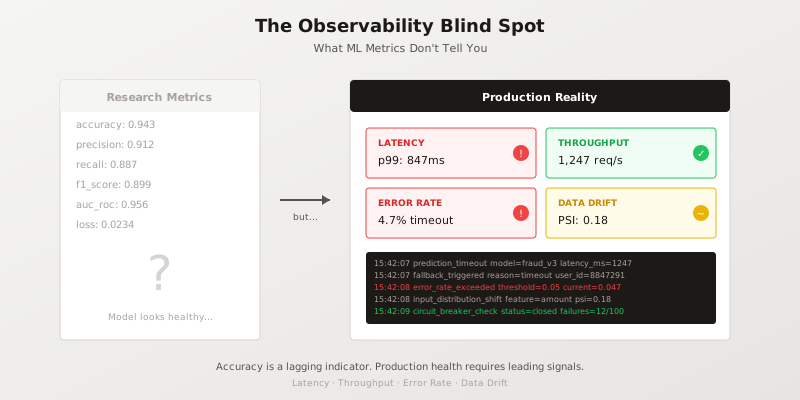
The dashboard shows 94.3% accuracy. The model is healthy. Everything is green.
Meanwhile, the on-call engineer is dealing with a flood of customer complaints about slow responses. Support tickets mention “the system just hangs.” The fraud team reports that decisions are taking so long that transactions are timing out.
The model is fine. The system is on fire.
This is the observability blind spot: the gap between what ML metrics tell you and what production systems actually need to know. It’s a gap that swallows engineering hours, damages customer trust, and makes incident response feel like archaeology.
The Fundamental Mismatch
Research metrics answer research questions. How well does this model generalise? Is it better than the baseline? Should we publish?
Production metrics answer operational questions. Is this system healthy right now? Should I wake someone up? What broke?
These are different questions. They require different measurements. But most ML systems conflate them, tracking accuracy and loss in production dashboards as if they were operational signals.
They’re not. Here’s why.
Accuracy Is a Lagging Indicator
By the time accuracy degrades measurably, the problem has been affecting users for hours or days. Accuracy requires ground truth labels, which often arrive with significant delay. In fraud detection, you might not know whether a decision was correct for 30 days. In recommendation systems, the feedback loop can take weeks.
Worse, accuracy is an aggregate. It tells you nothing about which requests are failing, which users are affected, or which code path is responsible. A 2% accuracy drop could mean a complete failure for one customer segment while everything else works perfectly.
Production systems need leading indicators — signals that predict problems before they impact aggregate metrics.
Loss Doesn’t Page
Training loss is useful for understanding model behaviour during development. In production, it’s noise. A model can have stable loss while timing out on every request. Loss doesn’t capture infrastructure failures, network latency, memory pressure, or any of the ways production systems actually break.
Production systems page on symptoms, not research metrics. “The model’s loss increased by 0.003” is not actionable at 3 AM. “P99 latency exceeded 500ms” is.
The Four Signals That Actually Matter
Production ML observability requires four categories of signals, none of which appear in a typical ML training loop:
1. Latency Distribution
Not average latency — the distribution. P50 tells you the typical experience. P99 tells you the worst 1% of users. P99.9 tells you whether your system can meet SLAs under load.
The gap between P50 and P99 reveals architectural problems. A system with P50 of 20ms and P99 of 800ms has a fundamentally different failure mode than one with P50 of 100ms and P99 of 150ms. The first system works great until it doesn’t. The second is consistently mediocre but predictable.
# Production-ready latency tracking
import time
from dataclasses import dataclass
from typing import Optional
import logging

logger = logging.getLogger(__name__)

@dataclass
class PredictionMetrics:
    latency_ms: float
    model_version: str
    input_size: int
    cache_hit: bool
    error: Optional[str] = None

def predict_with_metrics(model, input_data) -> tuple:
    start = time.monotonic()
    error = None
    result = None

    try:
        result = model.predict(input_data)
    except Exception as e:
        error = type(e).__name__
        raise
    finally:
        latency_ms = (time.monotonic() - start) * 1000
        metrics = PredictionMetrics(
            latency_ms=latency_ms,
            model_version=model.version,
            input_size=len(input_data),
            cache_hit=False,
            error=error
        )
        # Emit to your metrics system
        emit_metrics(metrics)

        # Log for debugging (structured, not printf)
        logger.info("prediction_complete",
            extra={
                "latency_ms": latency_ms,
                "model_version": model.version,
                "status": "error" if error else "success"
            }
        )

    return result, metrics
The key insight: measure at the boundary. Latency inside the model is interesting for optimisation. Latency at the API boundary is what users experience.
2. Throughput and Saturation
How many requests per second can your system handle? More importantly, how close are you to that limit right now?
Saturation is the ratio of current load to maximum capacity. A system at 30% saturation has headroom. A system at 90% saturation is one traffic spike away from degradation.
Track throughput at multiple levels:
- Requests received (what users are asking for)
- Requests processed (what you actually handled)
- Requests dropped (what you couldn’t handle)
The gap between received and processed is your error budget being consumed in real time.
3. Error Rate by Category
Not all errors are equal. A timeout is different from a validation error is different from a model exception. Production systems need error classification:
Infrastructure errors: Network timeouts, memory exhaustion, disk full. These are system problems, not model problems.
Input errors: Invalid data, missing fields, out-of-range values. These are caller problems, possibly indicating upstream issues.
Model errors: Exceptions during inference, NaN outputs, confidence below threshold. These are model problems.
Business errors: Prediction made but wrong, caught by downstream validation. These are the errors accuracy measures, but they arrive late.
from enum import Enum

class ErrorCategory(Enum):
    INFRASTRUCTURE = "infrastructure"
    INPUT_VALIDATION = "input_validation"
    MODEL_INFERENCE = "model_inference"
    BUSINESS_LOGIC = "business_logic"
    TIMEOUT = "timeout"

def categorise_error(exception: Exception, context: dict) -> ErrorCategory:
    if isinstance(exception, TimeoutError):
        return ErrorCategory.TIMEOUT
    if isinstance(exception, MemoryError):
        return ErrorCategory.INFRASTRUCTURE
    if isinstance(exception, ValueError) and "input" in str(exception).lower():
        return ErrorCategory.INPUT_VALIDATION
    if isinstance(exception, (RuntimeError,)) and context.get("in_model", False):
        return ErrorCategory.MODEL_INFERENCE
    return ErrorCategory.INFRASTRUCTURE  # Default to infra for unknown
Alert thresholds should differ by category. A spike in infrastructure errors at 2% might be critical. A spike in input validation errors at 5% might just mean a misbehaving client.
4. Data Drift
The input distribution in production will differ from training. The question is how much and whether it matters.
Population Stability Index (PSI) is a common measure. For a feature, it compares the distribution in a reference period to the current distribution:
import numpy as np

def calculate_psi(reference: np.ndarray, current: np.ndarray, bins: int = 10) -> float:
    """
    Calculate Population Stability Index between two distributions.
    PSI < 0.1: No significant shift
    PSI 0.1-0.25: Moderate shift, investigate
    PSI > 0.25: Significant shift, likely action needed
    """
    # Bin the reference distribution
    breakpoints = np.percentile(reference, np.linspace(0, 100, bins + 1))
    breakpoints[0] = -np.inf
    breakpoints[-1] = np.inf

    ref_counts = np.histogram(reference, bins=breakpoints)[0]
    cur_counts = np.histogram(current, bins=breakpoints)[0]

    # Convert to proportions, avoiding division by zero
    ref_pct = (ref_counts + 1) / (len(reference) + bins)
    cur_pct = (cur_counts + 1) / (len(current) + bins)

    # PSI formula
    psi = np.sum((cur_pct - ref_pct) * np.log(cur_pct / ref_pct))
    return psi
PSI alone doesn’t tell you whether drift matters for predictions. A feature could shift dramatically without affecting model output if other features compensate. But PSI is a leading indicator — it tells you something changed before you see accuracy degrade.
For a deeper treatment of drift detection in safety-critical contexts, see certifiable-monitor, which implements deterministic drift detection with Total Variation distance, Jensen-Shannon divergence, and PSI.
Structured Logging for ML Systems
Metrics tell you what’s happening. Logs tell you why. But most ML logging is either absent or useless — either no logs at all, or printf-style strings that can’t be queried.
Production ML systems need structured logs with consistent fields:
import json
import logging
from datetime import datetime

class StructuredLogger:
    def __init__(self, service_name: str):
        self.service = service_name
        self.logger = logging.getLogger(service_name)

    def log(self, event: str, level: str = "info", **context):
        record = {
            "timestamp": datetime.utcnow().isoformat() + "Z",
            "service": self.service,
            "event": event,
            "level": level,
            **context
        }
        getattr(self.logger, level)(json.dumps(record))

# Usage
log = StructuredLogger("fraud-model-v3")

log.log("prediction_start",
    request_id="req-8847291",
    user_id="usr-12345",
    model_version="v3.2.1",
    input_features=["amount", "merchant_category", "time_since_last"]
)

log.log("prediction_complete",
    request_id="req-8847291",
    latency_ms=47.3,
    prediction=0.73,
    confidence=0.89,
    cache_hit=False
)

log.log("prediction_error",
    level="error",
    request_id="req-8847292",
    error_type="TimeoutError",
    error_message="Model inference exceeded 100ms timeout",
    latency_ms=147.8
)
The key fields for ML systems:
- request_id: Correlate logs across services
- model_version: Know which model made which prediction
- latency_ms: Always track timing
- input_hash: Reproducibility without storing PII
- prediction + confidence: What the model actually said
- error_type + error_message: Categorised, searchable errors
With structured logs, incident investigation becomes querying: “Show me all predictions from model v3.2.1 where latency exceeded 200ms in the last hour.” Without them, it’s grep and prayer.
Alert Design: Actionable vs. Noise
The goal of alerting is to wake someone up when they can do something useful. Most ML alerting fails this test by alerting on research metrics or setting thresholds based on intuition rather than evidence.
Alerts That Work
Symptom-based: Alert on what users experience. “P99 latency > 500ms for 5 minutes” is actionable. “Model loss increased” is not.
Threshold from data: Set thresholds based on historical baselines, not round numbers. If P99 is normally 180ms with standard deviation of 40ms, alert at 300ms (3 sigma), not 500ms (a nice round number).
Rate of change: Sometimes the trend matters more than the absolute value. “Error rate increased 300% in 10 minutes” is more urgent than “Error rate is 1.5%.”
Composite signals: Combine metrics to reduce noise. Alert when latency is high AND error rate is rising AND throughput is dropping. Any one alone might be noise; together they’re a pattern.
Alerts That Don’t Work
Accuracy dropped: By the time you notice, it’s too late. And what are you going to do at 3 AM — retrain?
Loss increased: See above. Also, loss fluctuates normally.
Any single metric in isolation: Context matters. High latency during planned load testing isn’t an incident.
Threshold violations without duration: Momentary spikes happen. Require the condition to persist (5 minutes is a common minimum) before alerting.
The Observability Stack for ML
Putting this together, a production ML observability stack needs:
Metrics collection: Prometheus, Datadog, CloudWatch — tool doesn’t matter, consistency does. Emit the four signals (latency, throughput, errors, drift) from every model serving endpoint.
Structured logging: ELK, Loki, CloudWatch Logs — again, tool doesn’t matter. Structure does. JSON with consistent fields, queryable in incident response.
Distributed tracing: Jaeger, Zipkin, or cloud-native equivalents. ML requests often span services. When inference is slow, is it the model, the feature store, the network, or the downstream consumer?
Dashboards: One dashboard per service showing the four signals. Research metrics can go on a separate dashboard for the ML team. Operations dashboards show operational metrics.
Alerting: PagerDuty, Opsgenie, or equivalent. Route alerts based on category — infrastructure errors to platform team, model errors to ML team, business errors to product.
The Blind Spot Closed
The observability blind spot exists because ML teams optimise for research metrics while production systems fail in operational ways. Closing the gap requires treating ML services as services first, ML second.
Accuracy matters for model development. In production, it’s a lagging indicator at best. The signals that keep systems healthy are the same signals that keep any service healthy: latency, throughput, errors, and early warning of change.
Instrument for operations. Log for debugging. Alert for action. The model can be perfect and the system can still be down.
Production observability isn’t about watching the model. It’s about watching the system that contains the model.
For more on production ML infrastructure, see The Observability Gap in ML Systems and Production AI Systems: What 30 Years of UNIX Taught Me. For deterministic approaches to drift detection and runtime monitoring, explore certifiable-monitor.